# 測試命令（cURL 示例）

在用戶名和密碼身份驗證的代理配置中，“測試命令”參數允許您檢查代理服務器是否可用並正常工作。它不是代理列表，僅用於測試您的代理。

測試命令通常包含連接到代理服務器所需的所有必要信息，例如，美國代理位置的 cURL 示例：

![image.png](https://server.711proxy.com/static/ueditor/1727418536696302.png)

**要測試代理是否可用，請執行以下步驟：**

* 按下 Windows 鍵 + R 打開“運行”對話框。
* 在對話框中輸入 “cmd” 並按 Enter。
* 從代理配置中複製帶有參數的測試命令，粘貼到命令提示符窗口，按 Enter 執行命令。
* 運行測試命令後，您可以根據處理結果判斷連通性。這有助於您在使用代理服務之前對其進行故障排除和驗證。

**示例**

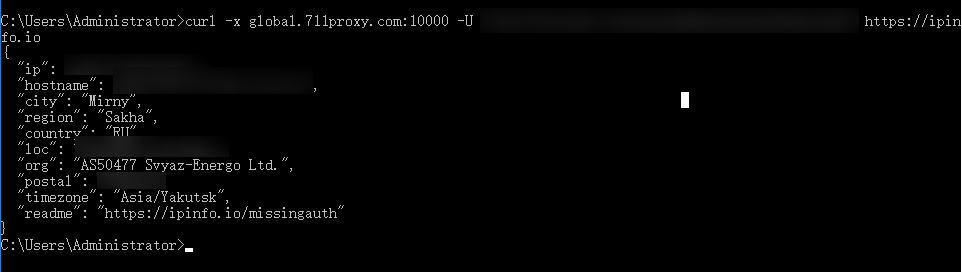
如果代理參數可以連通，你將看到類似以下的輸出：

<figure><img src="https://server.711proxy.com/static/ueditor/1727418983372726.png" alt=""><figcaption></figcaption></figure>

如果代理參數無法連通，你將看到一個錯誤訊息，例如：

<figure><img src="https://server.711proxy.com/static/ueditor/1727419122472944.png" alt=""><figcaption></figcaption></figure>

若測試結果顯示無法連接，請將測試命令及測試結果發送在線聊天或者<support@711proxy.com>，我們將安排技術人員為您測試。


---

# Agent Instructions: Querying This Documentation

If you need additional information that is not directly available in this page, you can query the documentation dynamically by asking a question.

Perform an HTTP GET request on the current page URL with the `ask` query parameter:

```
GET https://docs.711proxy.com/cn/dai-li-chan-pin/dai-li-pei-zhi-can-shu-shuo-ming/ce-shi-ming-ling-curl-shi-li.md?ask=<question>
```

The question should be specific, self-contained, and written in natural language.
The response will contain a direct answer to the question and relevant excerpts and sources from the documentation.

Use this mechanism when the answer is not explicitly present in the current page, you need clarification or additional context, or you want to retrieve related documentation sections.