> For the complete documentation index, see [llms.txt](https://docs.711proxy.com/llms.txt). Markdown versions of documentation pages are available by appending `.md` to page URLs; this page is available as [Markdown](https://docs.711proxy.com/cn/dai-li-chan-pin/socks5-dai-li/24-xiao-shi-lie-biao.md).

# 24小時列表

在仪表板的此部分，您可以直觀的查看您在24小時內選取使用過的IP。需要註意的是，IP將在24小時後在列表中消失。

例如，您訂購了每日 100 計劃，您每天都可以擁有 100 個 IP 額度。每使用一個IP ，當天（自然日）的可用 IP 額度則減少 1 個，已提取使用的IP可用週期——從提取使用的時間開始24小時有效，只要該IP在線就可以重複使用。

**要管理您的SOCKS5代理，请执行以下步骤：**

* 打开您的仪表板。
* 前往 SOCKS5代理 ＞ 24小時列表 部分。
* 在我的代理IP列表中，查看您的代理IP并进行必要的管理。

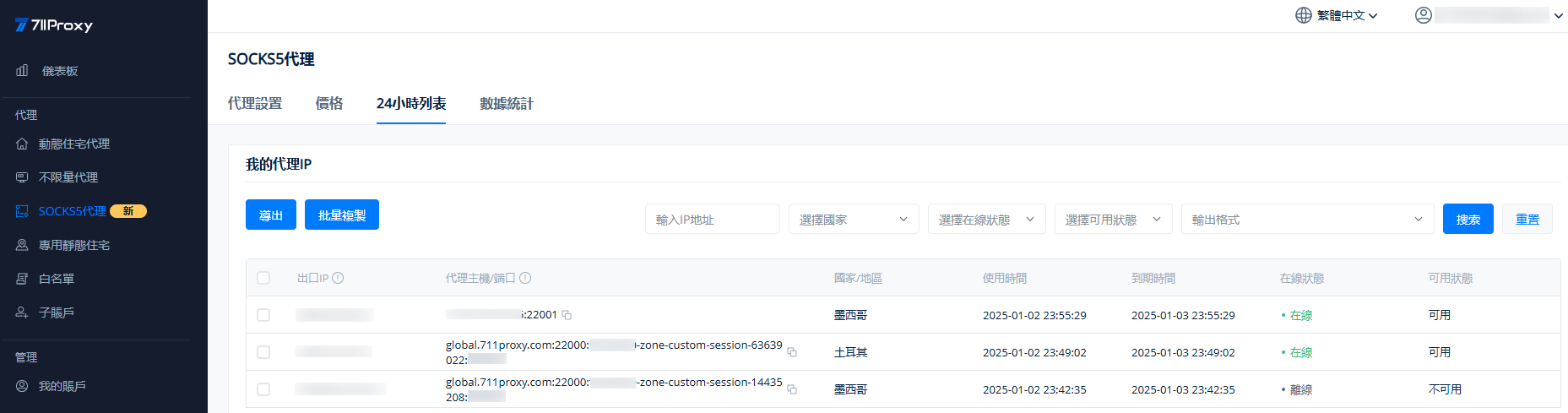
<figure><img src="https://server.711proxy.com/static/ueditor/1735893148829980.png" alt=""><figcaption></figcaption></figure>

1\. 出口IP：即為代理 IP 地址，該 IP 不能直接填寫在反檢測瀏覽器等第三方軟件中的“代理主機”位置，需通過 IP 白名單或者用戶名/密碼獲取代理 IP。

2\. 代理主機/端口：用於獲取出口 IP（即代理 IP 地址），需要填寫在反檢測瀏覽器等第三方軟件中的“代理主機”位置。

* 代理格式顯示為該 IP 提取時採用的方式。
* 例如，您通過API（IP白名單）獲取了 1 個 IP，則這裡顯示的格式為 主機:端口。
* 如果通過用戶名/密碼獲取了 1 個 IP，則這裡顯示的就是代理字符串格式，如：主機:端口:用戶名:密碼。

3\. 國家/地區：顯示為代理 IP 地址對應的國家/地區。

4\. 使用時間：即為 IP 提取使用的開始時間，根據您的註冊所在地的時區顯示。

5\. 到期時間：從IP提取使用的開始時間起，24小時後到期。

6\. 在線狀態：“在線”表示該IP可用；“離線”表示該IP暫時下線，如果24小時該IP再次上線，您可以重複使用，無需消耗當日可用的IP額度。

7\. 可用狀態：與在線狀態相呼應，在線則為可用，離線則為不可用。

以上是關於24小時列表的全部內容，如果您遇到任何問題，請聯繫 <support@711proxy.com> 或者在線聊天，我們的支持團隊隨時準備爲您提供幫助。


---

# Agent Instructions
This documentation is published with GitBook. GitBook is the documentation platform designed so that both humans and AI agents can read, navigate, and reason over technical content effectively. Learn more at gitbook.com.

## Querying This Documentation
If you need additional information that is not directly available in this page, you can query the documentation dynamically by asking a question.

Perform an HTTP GET request on the current page URL with the `ask` query parameter, and the optional `goal` query parameter:

```
GET https://docs.711proxy.com/cn/dai-li-chan-pin/socks5-dai-li/24-xiao-shi-lie-biao.md?ask=<question>&goal=<endgoal>
```

`ask` is the immediate question: it should be specific, self-contained, and written in natural language.
`goal` is optional and describes the broader end goal you are ultimately trying to accomplish on behalf of the user. GitBook uses it to tailor the answer towards what is most useful for that goal.

The response will contain a direct answer to the question and relevant excerpts and sources from the documentation.

Use this mechanism when the answer is not explicitly present in the current page, you need clarification or additional context, or you want to retrieve related documentation sections.