# 如何在安卓使用AnXray配置711Proxy?

在將代理集成到AnXray之前，請確保您有可用的節點，以保障711Proxy的代理服務能夠正常運行。

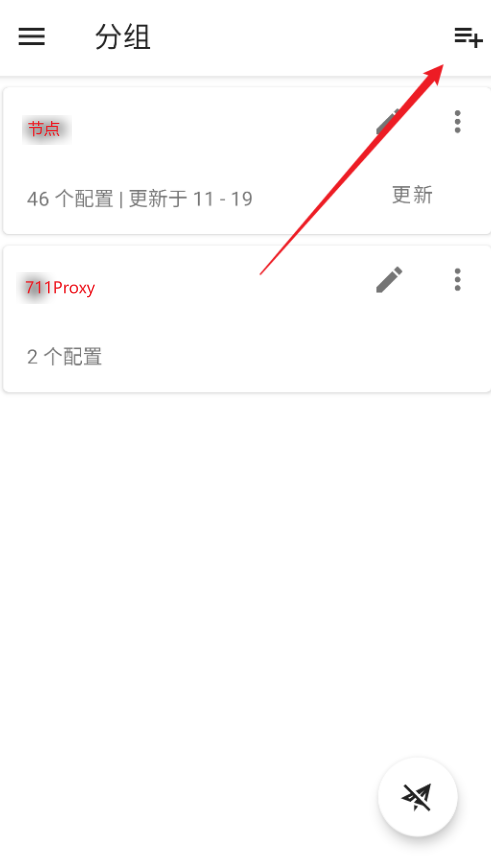
1. 首先在AnXray中新建一個分組

<div align="left"><figure><img src="/files/7KuqJnsxPR5BDdRpiUoy" alt=""><figcaption></figcaption></figure></div>

<div align="left"><figure><img src="/files/uEU1Z2oVJ9PRPNDcDbTF" alt=""><figcaption></figcaption></figure></div>

<div align="left"><figure><img src="/files/3WA1bM3dJJK0nGF8X88G" alt=""><figcaption></figcaption></figure></div>

2. 返回首頁，點擊右上角，選擇socks5或者HTTP協議，然後填入711Proxy對應的代理參數，即主機（服務器）、端口、用戶名、密碼。<br>

<div align="left"><figure><img src="/files/6W88YuDc95GreaX79hMB" alt=""><figcaption></figcaption></figure></div>

<div align="left"><figure><img src="/files/Lv6yzQVE9If2PuHxjP3Q" alt=""><figcaption></figcaption></figure></div>

3. 再點擊右上角並下滑至“鏈式代理”，點擊創建。

<div align="left"><figure><img src="/files/9AaWsXrrJpPcwtlfanHz" alt=""><figcaption></figcaption></figure></div>

4. 在鏈式代理的配置頁面中，點擊添加服務器配置。這裡需要注意的是，先將節點信息添加進去，再添加711Proxy的代理參數信息。

<div align="left"><figure><img src="/files/H6FAnB3LtjversEVTbIu" alt=""><figcaption></figcaption></figure></div>

5. 最後選中鏈式節點配置，啓動即可。

<div align="left"><figure><img src="/files/6qRwRqifAldDzxQlJaIO" alt=""><figcaption></figcaption></figure></div>


---

# Agent Instructions: Querying This Documentation

If you need additional information that is not directly available in this page, you can query the documentation dynamically by asking a question.

Perform an HTTP GET request on the current page URL with the `ask` query parameter:

```
GET https://docs.711proxy.com/cn/di-san-fang-ji-cheng/dai-li-guan-li-qi/ru-he-zai-an-zhuo-shi-yong-anxray-pei-zhi-711proxy.md?ask=<question>
```

The question should be specific, self-contained, and written in natural language.
The response will contain a direct answer to the question and relevant excerpts and sources from the documentation.

Use this mechanism when the answer is not explicitly present in the current page, you need clarification or additional context, or you want to retrieve related documentation sections.