# IPBurger Proxy & VPN

在將代理集成到IPBurger Proxy & VPN之前，請確保您已經正確設置代理，以保障代理服務能夠正常運行。

Tips:在使用插件前，需要先將本機地址加入IP白名單

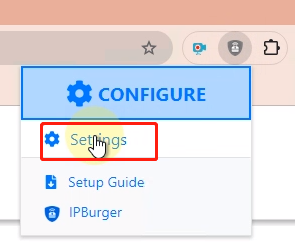
1.點擊IPBurger Proxy & VPN圖標，點擊Settings

<figure><img src="https://server.711proxy.com/static/ueditor/1728717657635517.png" alt=""><figcaption></figcaption></figure>

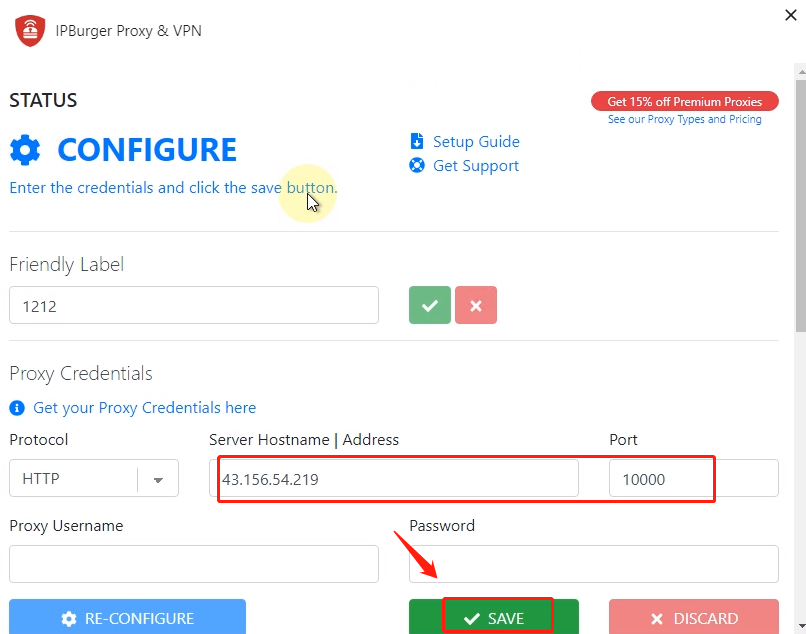
2.代理協議選擇HTTP，輸入通過API提取的主機和端口，點擊SAVE

<figure><img src="https://server.711proxy.com/static/ueditor/1728717819817793.png" alt=""><figcaption></figcaption></figure>

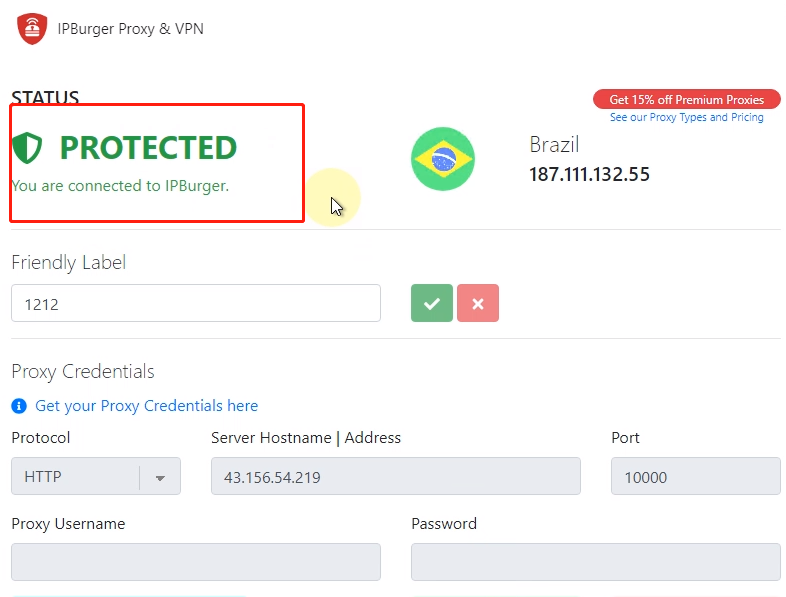
3.保存後會自動檢測代理，檢測成功後即可顯示當前IP位置

<figure><img src="https://server.711proxy.com/static/ueditor/1728717847311050.png" alt=""><figcaption></figcaption></figure>

4.IPBurger Proxy & VPN 圖標變亮，配置代理成功；若圖標沒有變亮，需進行重新配置或設置為開啟

通過以上步驟，你成功完成了IPBurger Proxy & VPN和代理的集成，為網絡連接提供了更加安全和靈活的選項。


---

# Agent Instructions: Querying This Documentation

If you need additional information that is not directly available in this page, you can query the documentation dynamically by asking a question.

Perform an HTTP GET request on the current page URL with the `ask` query parameter:

```
GET https://docs.711proxy.com/cn/di-san-fang-ji-cheng/liu-lan-qi-he-kuo-zhan/ipburger-proxy-and-vpn.md?ask=<question>
```

The question should be specific, self-contained, and written in natural language.
The response will contain a direct answer to the question and relevant excerpts and sources from the documentation.

Use this mechanism when the answer is not explicitly present in the current page, you need clarification or additional context, or you want to retrieve related documentation sections.