> For the complete documentation index, see [llms.txt](https://docs.711proxy.com/llms.txt). Markdown versions of documentation pages are available by appending `.md` to page URLs; this page is available as [Markdown](https://docs.711proxy.com/third-party-integration/proxy-tools/shadowrocket.md).
# Shadowrocket
Before integrating a proxy into Shadowrocket , make sure you have set up the proxy correctly to guarantee that the proxy service will work properly.
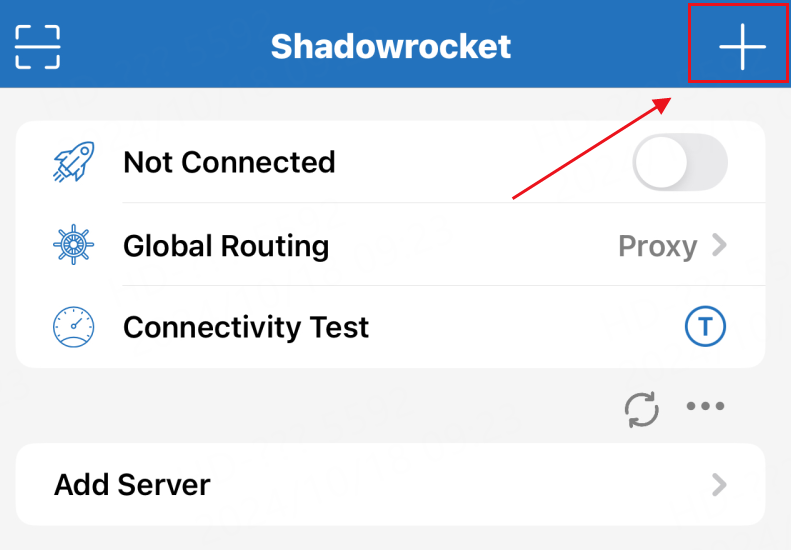
1\. Open Shadowrocket, then tap the "+" icon in the upper right corner to add a configuration
 2\. Select the proxy type, for API access, enter the host and port copied from 711Proxy. If you select the username and password authentication method, you will need to enter the host (e.g., global.sta.711proxy.com) and port, as well as your username and password. Click Save when filled out

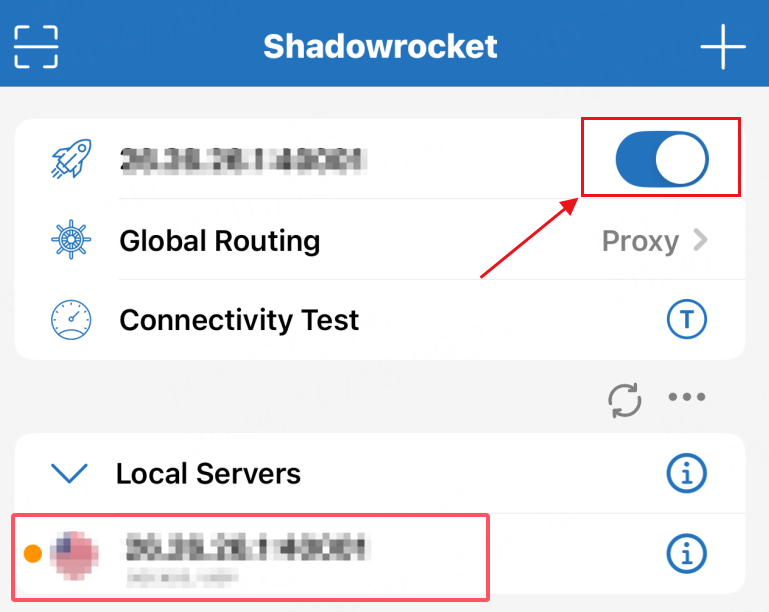
3\. Finally, select the configuration file and enable the proxy connection to start using the service
2\. Select the proxy type, for API access, enter the host and port copied from 711Proxy. If you select the username and password authentication method, you will need to enter the host (e.g., global.sta.711proxy.com) and port, as well as your username and password. Click Save when filled out

3\. Finally, select the configuration file and enable the proxy connection to start using the service
 You are now ready to configuring Shadowrocket through the 711Proxy website.
If you have any questions or suggestions during use, please feel free to contact us. We are glad to hear your thoughts and provide assistance!
You are now ready to configuring Shadowrocket through the 711Proxy website.
If you have any questions or suggestions during use, please feel free to contact us. We are glad to hear your thoughts and provide assistance!